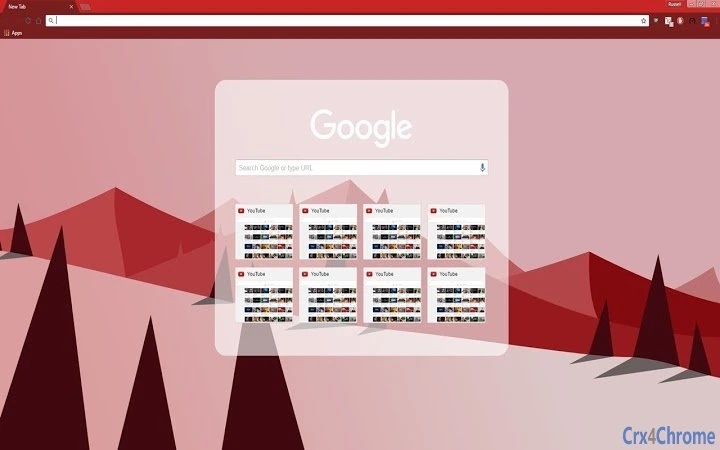

Red Vector Theme for Web Browsing
Overview
The Red Vector Theme is a desktop utility designed to enhance the visual experience of web browsing through a clean, modern interface with a distinctive red-themed design. Built around a vector-based mountain range backdrop, the theme offers a visually engaging environment that complements standard web navigation. It is tailored for users seeking aesthetic customization without compromising readability or usability. The software is ideal for individuals who value both functionality and visual appeal in their browsing experience.
While the developer has not provided additional background information, the theme appears to be focused on personalization for both Windows and Mac users. It serves as a lightweight utility that integrates seamlessly into existing web browsers, allowing users to refresh their digital workspace with minimal effort. Real-world use cases include personalizing a home office setup, improving focus through visual consistency, or simply enjoying a more vibrant browsing environment.
Key Features & Capabilities
- Vector-Based Mountain Background – A high-quality, scalable mountain range design ensures sharp visuals across all screen resolutions and DPI settings.
- Red-Themed Aesthetic – A bold red color scheme enhances contrast and visual interest while maintaining readability.
- Modern, Clean Design – Minimalist layout avoids visual clutter, allowing users to focus on content.
- Easy Integration with Browsers – Designed to work with standard web browsers, enabling quick application without complex setup.
- Lightweight File Size – At just 2.1 MB, the theme installs quickly and consumes minimal system resources.
These features allow users to transform their browser’s appearance with a cohesive visual identity. For example, a designer might use the theme to create a consistent mood across digital projects, while a remote worker could use it to personalize their workspace and reduce visual fatigue. The theme’s focus on scalability and clarity ensures it remains effective on both high-resolution monitors and standard displays.
User Interface, Workflow & Performance
The user interface of the Red Vector Theme is entirely dependent on the host browser’s interface, as it functions as a visual overlay rather than a standalone application. Navigation and activation are straightforward, typically involving a few clicks within the browser’s extension or theme manager. The workflow is designed to be intuitive, with minimal disruption to the user’s browsing habits.
Performance characteristics were not specified by the developer. However, given its lightweight nature and vector-based design, it is expected to have low impact on CPU and memory usage. The theme does not introduce additional processes or background tasks, which contributes to stability during extended use. No performance issues were reported in the provided information.
Compatibility & System Requirements
The Red Vector Theme is compatible with both Windows and Mac operating systems, supporting the latest versions of major web browsers on these platforms. The software version is 1.0, and the installation size is 2.1 MB. This indicates a compact footprint, suitable for systems with limited storage or older hardware.
Exact system requirements were not listed. Compatibility with specific browser versions or hardware configurations is not confirmed. Users should verify compatibility with their current browser and operating system setup. The developer did not provide additional details on minimum specifications or supported platforms beyond the general OS mention.
Pros and Cons
Pros
- Visually striking red vector design enhances browsing experience
- Lightweight at only 2.1 MB
- Scalable vector graphics ensure sharp visuals on all displays
- Simple installation and activation process
- Free to use with no licensing restrictions
Cons
- No additional features beyond visual customization
- Performance behavior not publicly documented
- Limited to browser-based applications
- Developer background not disclosed
- Does not include advanced customization options
FAQ Section
Is the Red Vector Theme compatible with my browser?
The theme is designed for use with standard web browsers on Windows and Mac. Compatibility with specific browser versions was not detailed by the developer.
Is the theme safe to install?
As a visual theme, it does not introduce executable code or system-level changes. It operates within the browser’s security model, making it a low-risk addition.
Can I update the theme automatically?
Automatic updates depend on the browser’s extension or theme management system. The developer did not specify update mechanisms.
Is this theme available for free?
Yes, the Red Vector Theme is available at no cost. There are no paid features or subscription requirements.
Does the theme work offline?
Once installed, the theme functions without an internet connection. It does not require ongoing online access to operate.
Final Thoughts
The Red Vector Theme delivers a focused, visually appealing enhancement for web browsing. Its clean design, bold red aesthetic, and vector-based graphics offer a modern look that stands out without overwhelming the user. While it lacks advanced functionality, its simplicity is a strength for users seeking a quick, safe, and attractive way to personalize their browser interface.
It is best suited for casual users, digital creatives, and anyone who values a refreshed visual experience. With no cost and minimal system impact, it presents a low-risk way to experiment with browser aesthetics. For those looking to elevate their browsing environment with a unique, scalable backdrop, this theme offers a compelling option.
Download Red Vector Theme now







